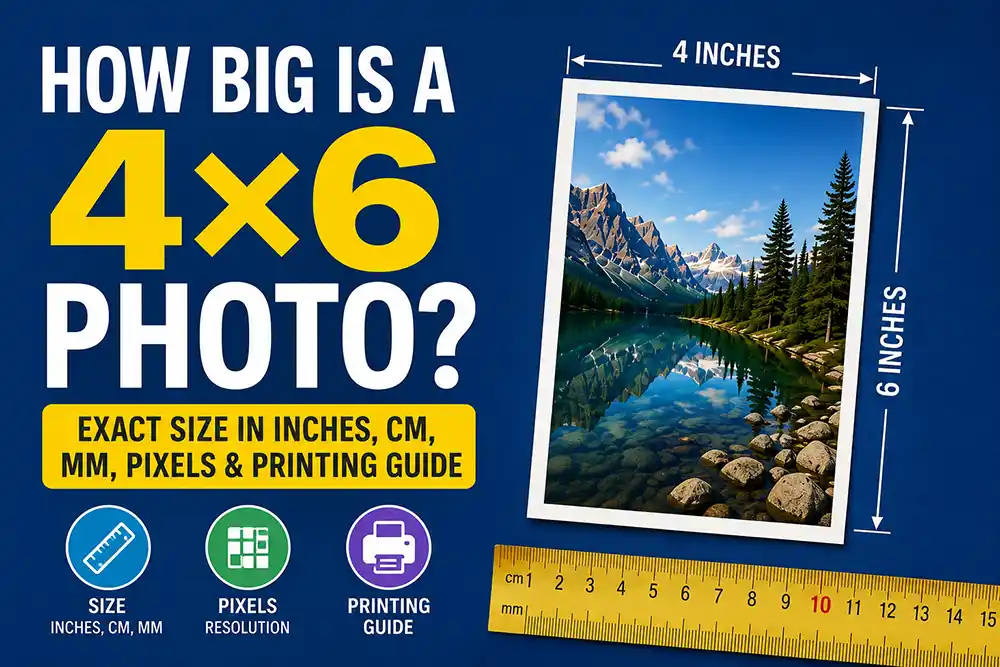
How Big Is a 4×6 Photo? Exact Size in Inches, cm, mm, Pixels & Printing Guide
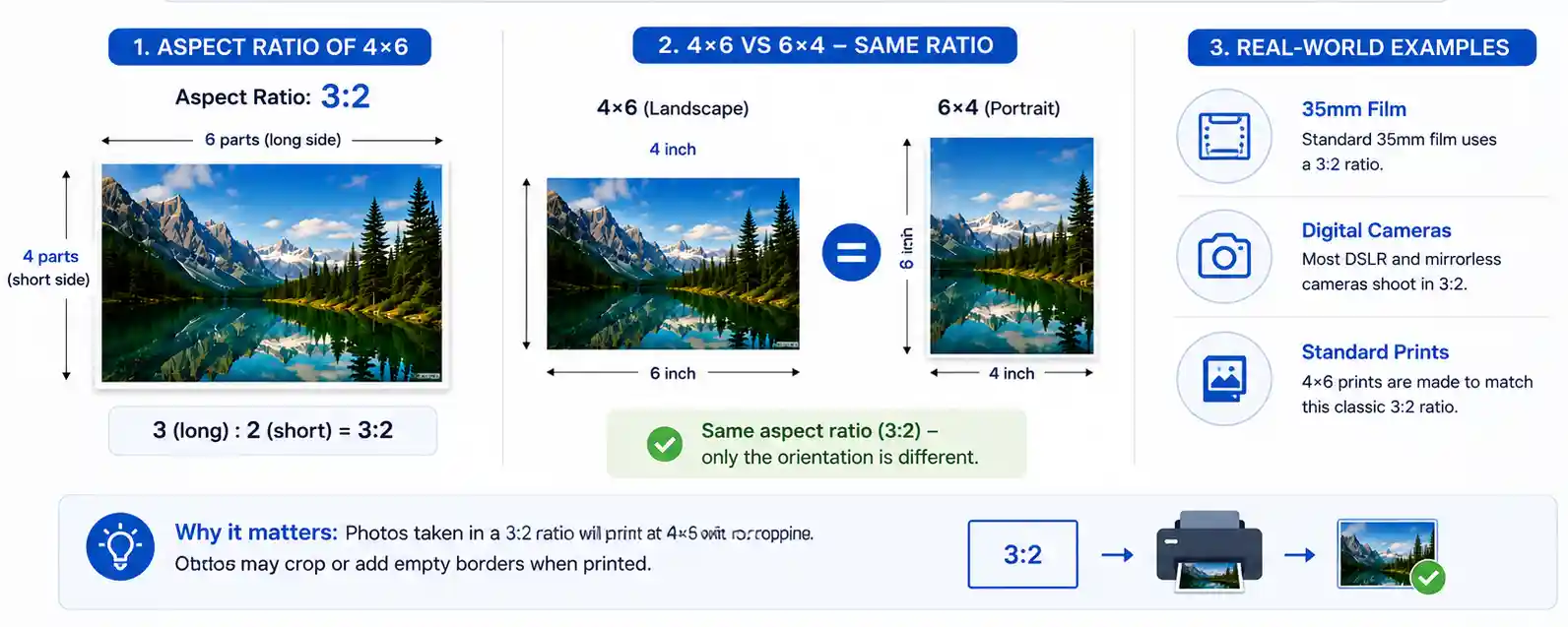
4×6 photo size: 4 × 6 in = 10.16 × 15.24 cm = 101.6 × 152.4 mm. Aspect ratio 3:2. At 300 PPI: 1200 × 1800 px (~2.2 MP). It’s the world’s most popular print size because it matches the 35mm film ratio — most camera photos print with no cropping.
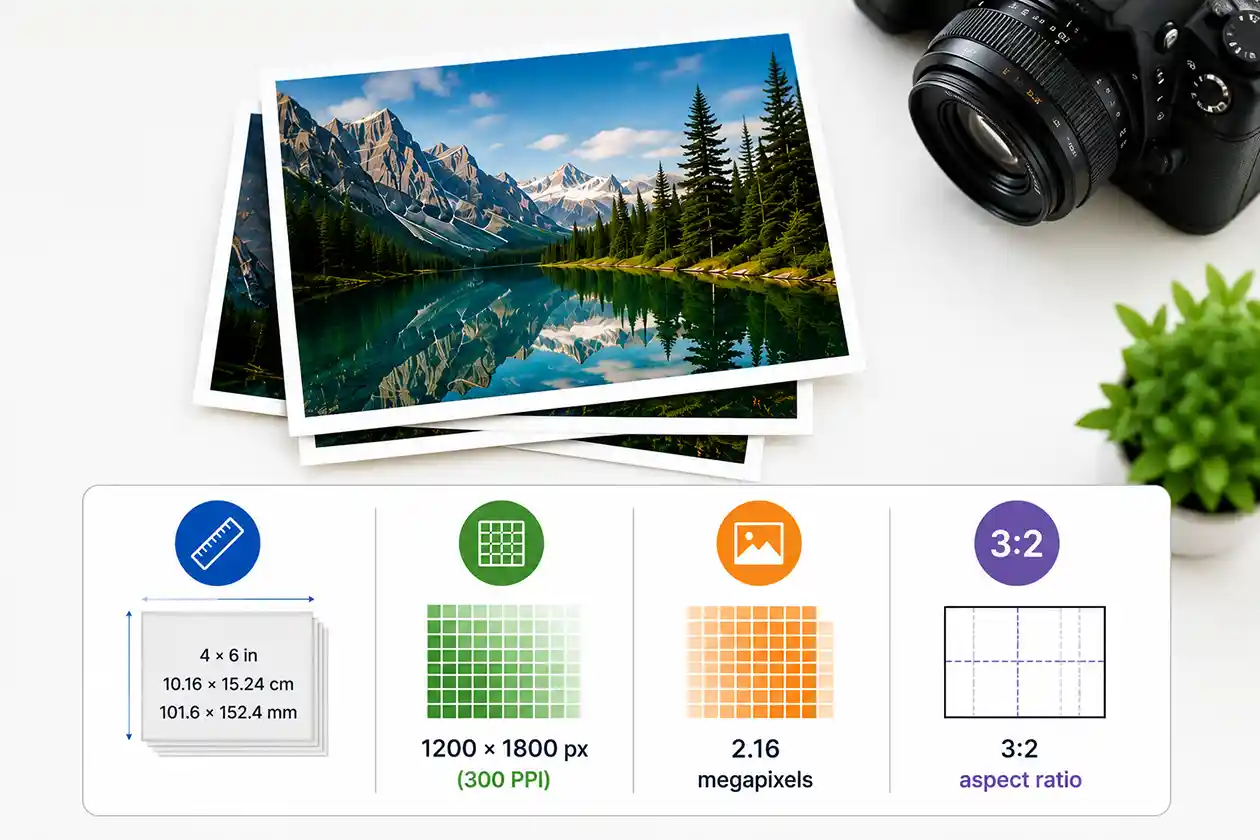
Ever had prints come back with the edges cut off, or looking soft when the photo was sharp on your phone? It’s rarely the paper size — it’s aspect ratio and file quality, and both are easy to fix.
Below: the exact 4×6 size in every unit, the pixels you need, why phone photos crop, and how to avoid the two mistakes that ruin most prints.
4×6 Photo Dimensions in Every Unit (Inches, cm, mm, Feet)
A 4×6 photo is exactly 4 inches wide by 6 inches tall (or 6 wide by 4 tall — more on that shortly). Converted:
- Inches
- Centimeters
- Millimeters
- Feet
- 4 × 6 in
- 10.16 × 15.24 cm
- 101.6 × 152.4 mm
- 0.33 × 0.5 ft
Outside the US, 4×6 prints are sold as 10 × 15 cm — a rounded label for the true 10.16 × 15.24 cm. The gap is under 2.5 mm on the long edge, so a 10×15 in Europe or Asia and a 4×6 in the US are the same print.
For scale: it matches a standard postcard or a 4×6 index card, and its long edge is about the length of a US dollar bill.
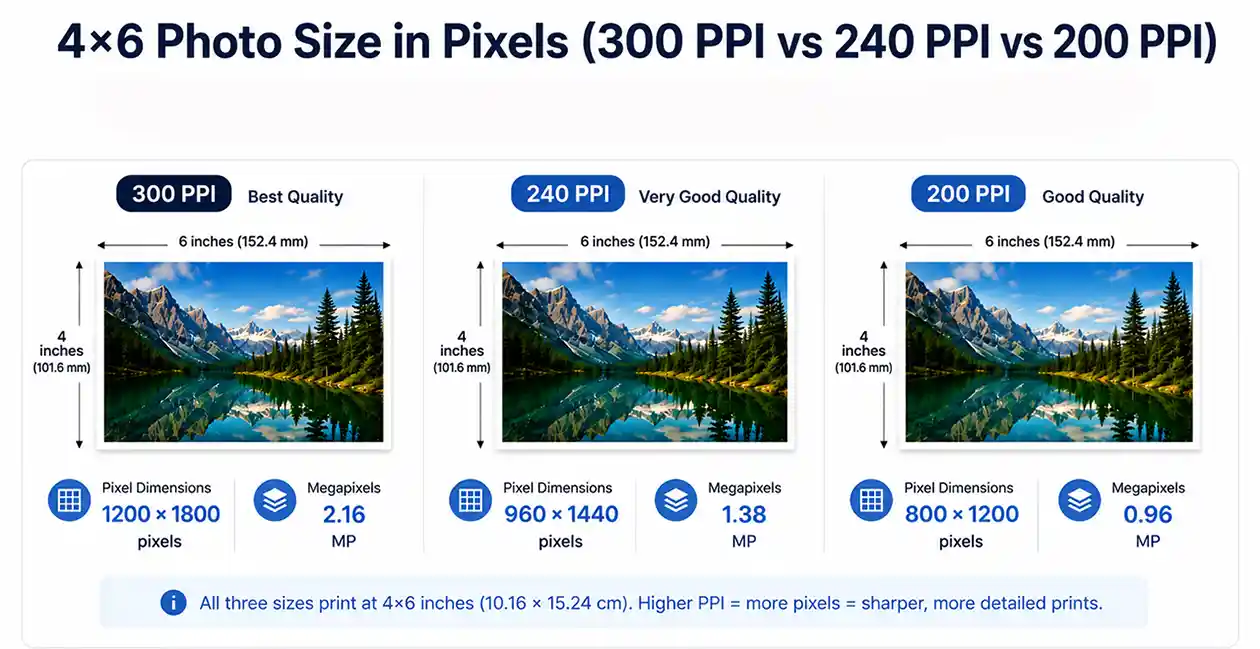
4×6 Photo Size in Pixels (300 PPI vs 240 PPI vs 200 PPI)
Inches describe the paper. Pixels describe the file. To convert between them you only need one number — PPI (pixels per inch), the density of pixels the printer lays down on each inch of paper.
300 PPI, and how much you can bend it
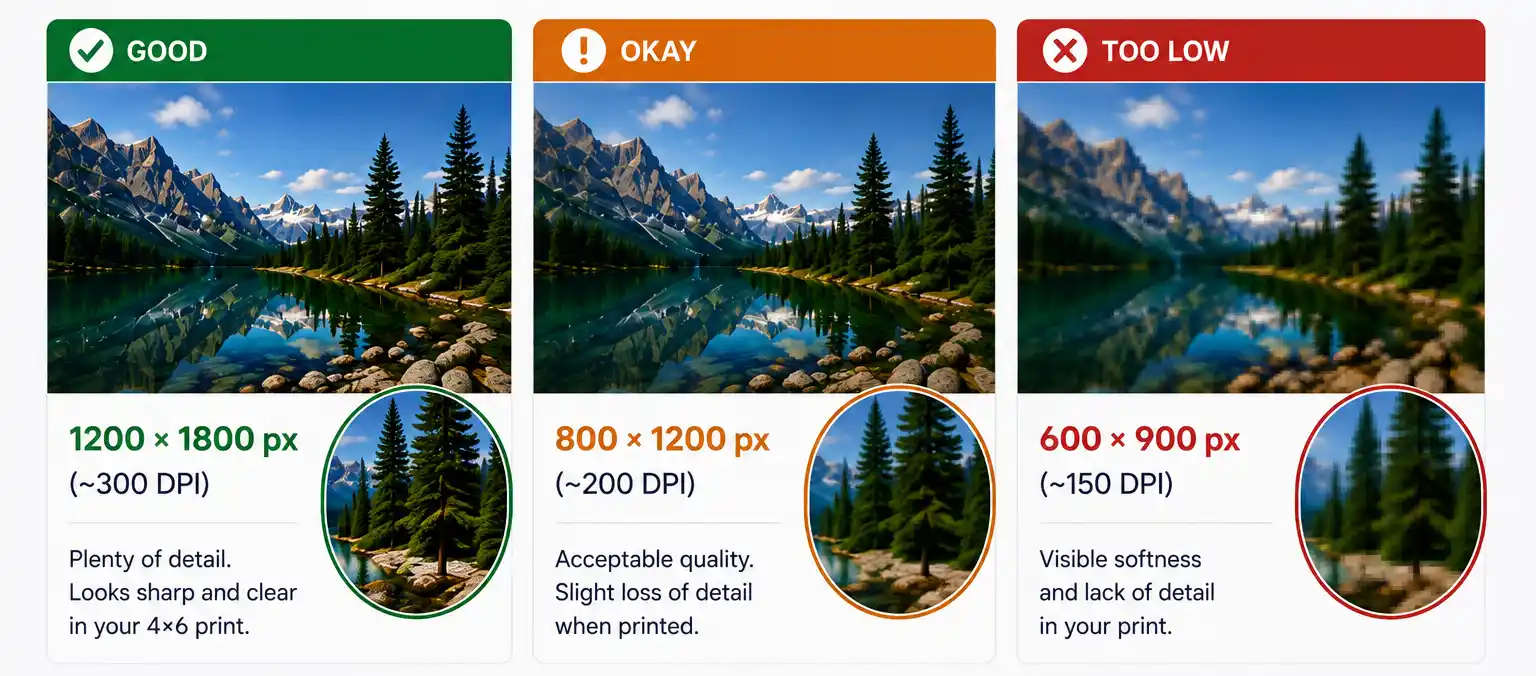
300 PPI is the hand-held standard because that’s roughly what the eye resolves at reading distance. But it isn’t a cliff — at 240 PPI (a tier most labs quietly accept) a 4×6 still looks excellent in an album or a frame. Below about 200 PPI, fine detail like hair, text and foliage goes soft.
DPI vs PPI. Used interchangeably in practice, but PPI counts pixels in a file and DPI counts ink dots a printer lays down. When a lab asks for “300 DPI,” it means 300 pixels per inch.
Expected file sizes. A 1200 × 1800 JPEG at high quality runs 1–3 MB; the same image as a TIFF is around 6 MB. A file of only a few hundred KB is a warning sign — see the blurry-print section below.
What Is the Aspect Ratio of a 4×6? (And Why 6×4 Is the Same Thing)
The 3:2 aspect ratio
A 4×6 is 3:2 — the long side is 1.5× the short side (6 ÷ 4 = 1.5).
Is 4×6 the same as 6×4? Yes, identical print. 4×6 usually implies portrait, 6×4 landscape. Same paper, same ratio, same price; labs use the terms interchangeably.
3:2 is why 4×6 became the default. It’s the native ratio of 35mm film (24 × 36 mm) and of nearly every DSLR and mirrorless camera since — shoot Canon, Nikon, Sony or Fujifilm and your image fits with nothing cut off.
Prints that share 3:2 and crop identically from the same file: 6×9, 8×12, 12×18, 16×24, 20×30. If a photo looks right at 4×6, it looks the same at 8×12 — just bigger.
The Phone Problem: Why Your 4×6 Gets Cropped
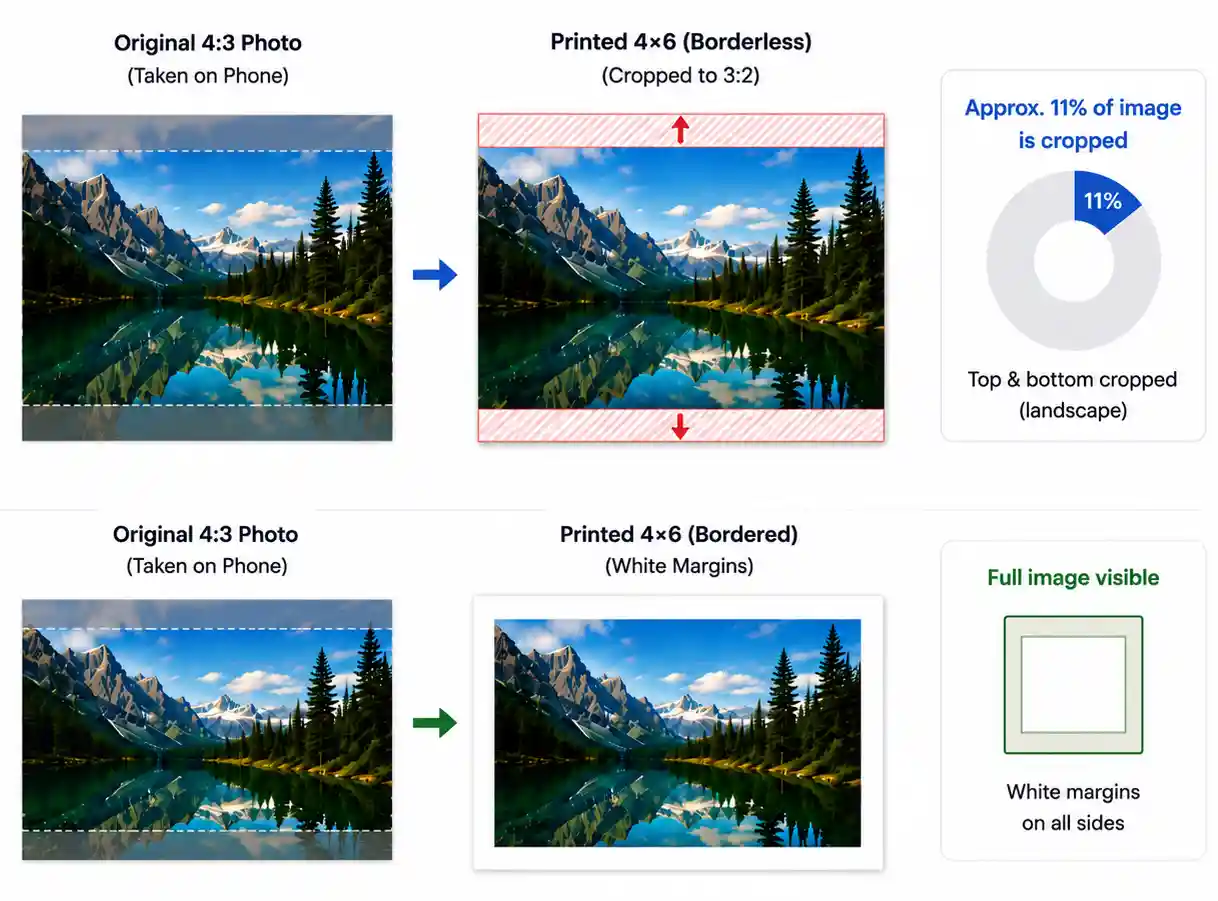
Most phones don’t shoot 3:2. iPhone, Galaxy and Pixel default to 4:3 — proportionally squarer than a 4×6. The shapes don’t match, so something has to give.
Borderless (full-bleed) — the lab scales your image to fill the sheet and trims the overhang. Edge-to-edge, no white margin, but a 4:3 photo loses about 11% of the frame: top and bottom on a landscape shot, left and right on a portrait. Labs also trim 2–3 mm per side as production tolerance, so anything critical at the edge is at risk.
Bordered (fit-to-size) — the whole image fits, leftover space becomes white margins. Nothing is cropped.
Use borderless for landscapes, gifts and framed prints. Use bordered when the composition is tight, when text or a horizon sits near the edge, or for group photos with someone’s shoulder at the boundary.
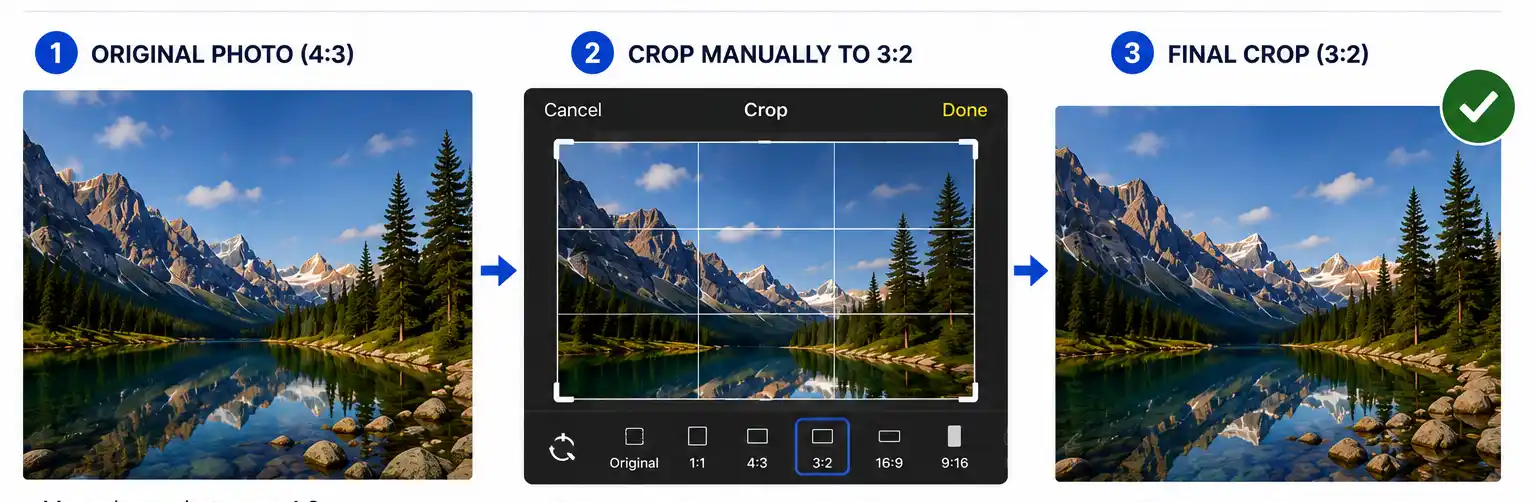
How to crop to 3:2 before you print
Make the crop decision yourself instead of leaving it to the lab’s algorithm. In Photos, Lightroom, Snapseed, Photoshop or any free web tool:
- Set the crop ratio to 3:2 (some apps list it as “4×6” or “6×4”).
- Reposition the frame and check what’s being cut — top and bottom on a landscape, left and right on a portrait.
- Keep faces, hands, text and horizons a few millimetres clear of the edges to survive the lab’s trim.
- Export at full resolution (1200 × 1800 px minimum) as a high-quality JPEG or TIFF. Don’t resize down.
Pro tip: most phones can shoot 3:2 natively in the camera settings. If a shoot is destined for prints, switch before you start — you’ll compose to the final frame and keep every pixel.
Why Do 4×6 Prints Look Blurry? (It’s Usually Not the Size)
When a 4×6 comes back soft, the cause is usually compression, not resolution.
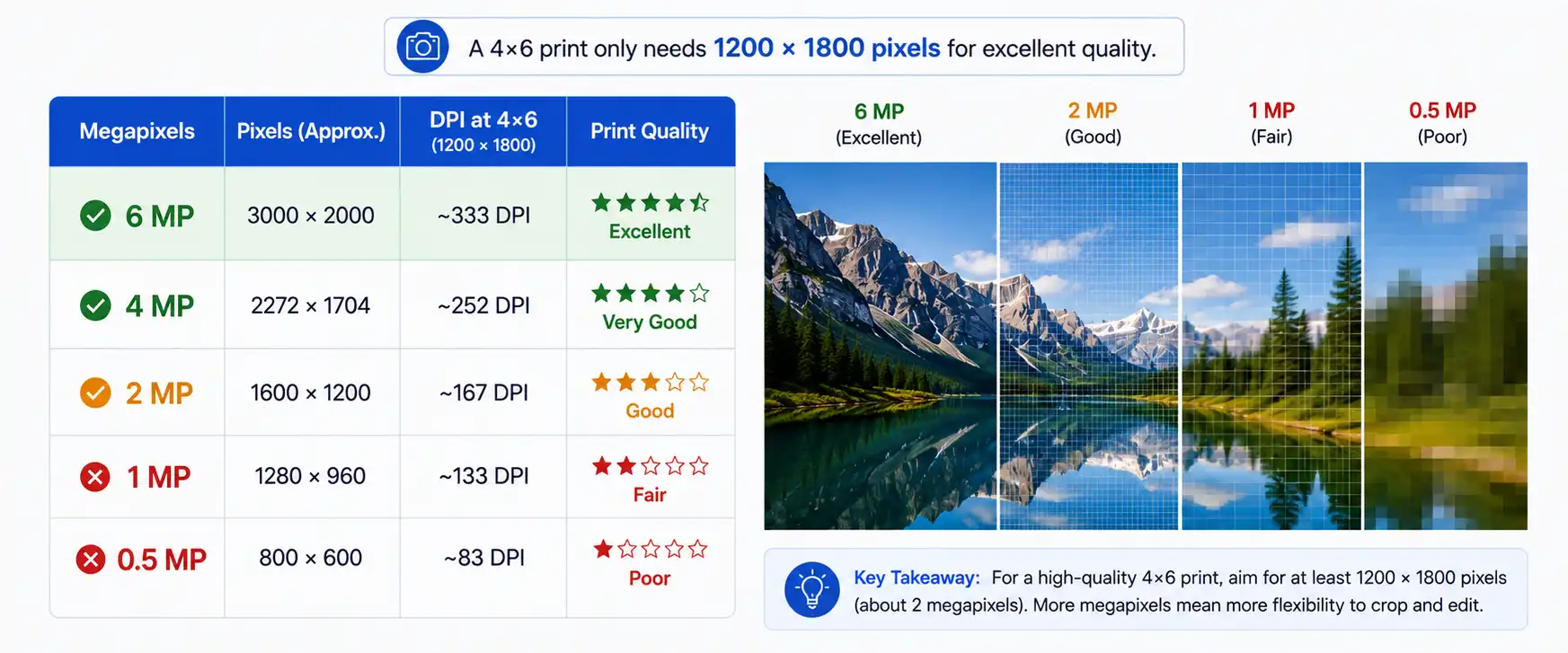
A 4×6 only needs about 1200 × 1800 pixels (300 DPI) to look sharp. Every phone shoots files much larger than that, so resolution is rarely the real issue. The damage happens on the way to you:
- Messaging apps (WhatsApp, Messenger, iMessage) often recompress and shrink photos. Send as a “Document” on WhatsApp to avoid this.
- Social media downloads give you the platform’s compressed copy, often under 1000 px.
- Screenshots only capture screen resolution, not the original file.
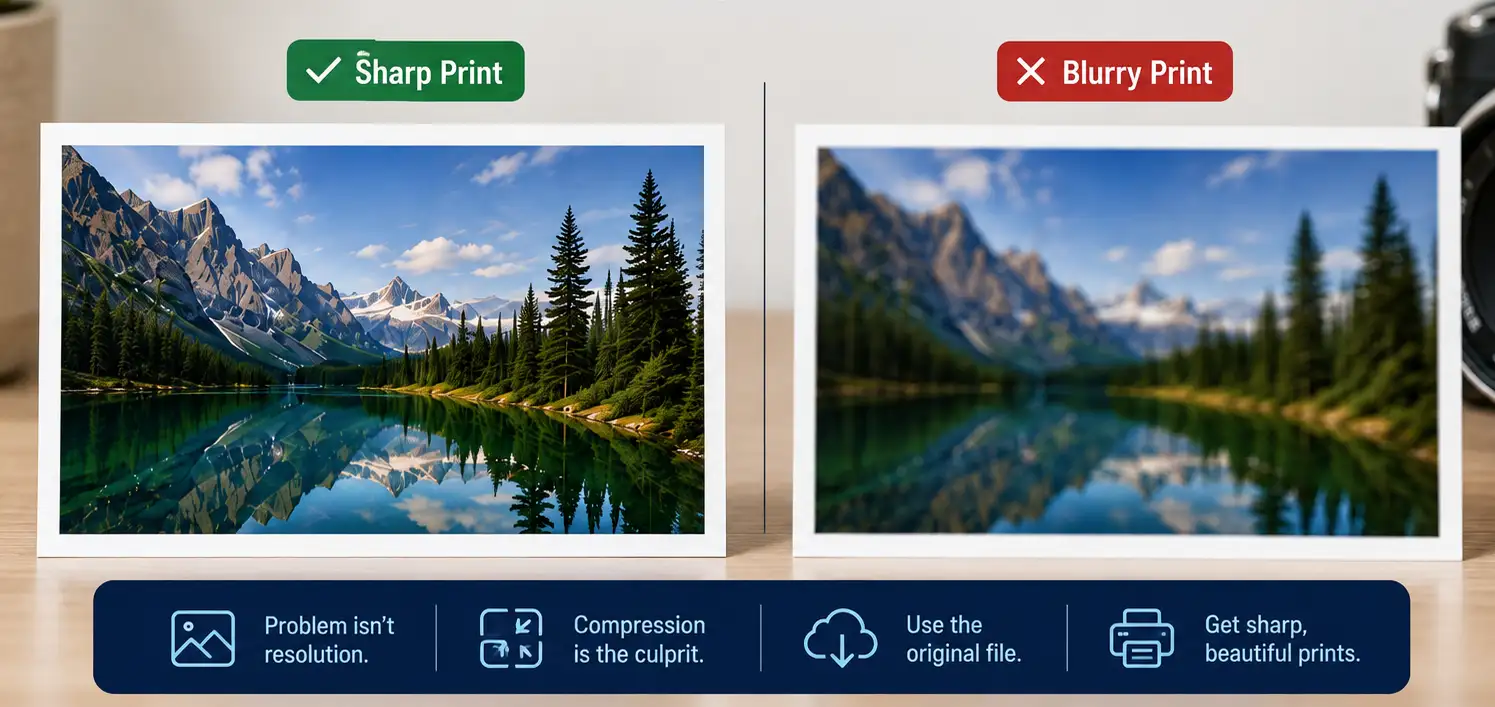
A photo can look perfect on a phone screen and still be missing most of its data by the time it hits paper.
The fix: always print from the original file — your camera roll, cloud backup (full-size, not preview), or memory card. If someone sends you a photo, ask them to AirDrop it, share it from the cloud, or email it at “actual size.
On AI upscaling: it can rescue a borderline photo, but it can’t recover detail that was never there — it invents pixels instead. Fine for a small print in most cases, but treat it as a last resort, not a habit.
How Many Megapixels Do You Need for a 4×6 Print?
“1.38 MP at 240 PPI” — worth double-checking your target. 240 PPI over 4×6 gives 960 × 1440 = 1,382,400 px ≈ 1.38 MP. That’s correct, just flagging it’s a slightly unusual benchmark to cite (most print labs quote 300 as “full quality” and 150–200 as the “acceptable” floor) — if a reader looks up minimum print PPI elsewhere they may see 150 or 200 more often than 240. Not wrong, just pick the number deliberately.
Even a 15-year-old point-and-shoot clears the bar” — mostly true, worth a small hedge. Point-and-shoots from 2011 were typically 10–16 MP, so this holds. Camera phones from the very early smartphone era (2009–2010, 2–5 MP) are the real edge case if anyone’s scanning old phone photos — but that’s a minor enough case it may not be worth a caveat at this length.
The two caveats at the end are the most valuable part — they preempt the obvious “so any photo prints fine?” misread. I’d keep those essentially as-is.
One small addition that’d cost a sentence: a line connecting this piece to the compression piece before it — something like “this assumes you’re working from the original file — see [above] for what erodes it in transit” — since a reader could otherwise take “12 MP is 5-20x what you need” as license to not worry about compression at all.
Want me to draft a tightened version with these folded in, or is this close to final as-is?
4×6 vs Other Photo Sizes (3×5, 5×7, 8×10, 11×14)
Not all print sizes share the same shape, which is why the same photo crops differently depending on what you order.
| Size | Aspect ratio | Matches a 3:2 camera? | Best for |
| 3×5 in | 5:3 | Near-match (slight crop) | Small albums, cards, wallets-plus |
| 4×6 in | 3:2 | Yes — no crop | Albums, frames, gifts, everyday prints |
| 5×7 in | 7:5 | No — crops | Desk frames, greeting cards, portraits |
| 8×10 in | 5:4 | No — crops significantly | Portraits, wall frames, certificates |
| 8×12 in | 3:2 | Yes — no crop | Enlargements of any 4×6-ready photo |
| 11×14 in | 14:11 | No — crops | Statement wall pieces, matted frames |
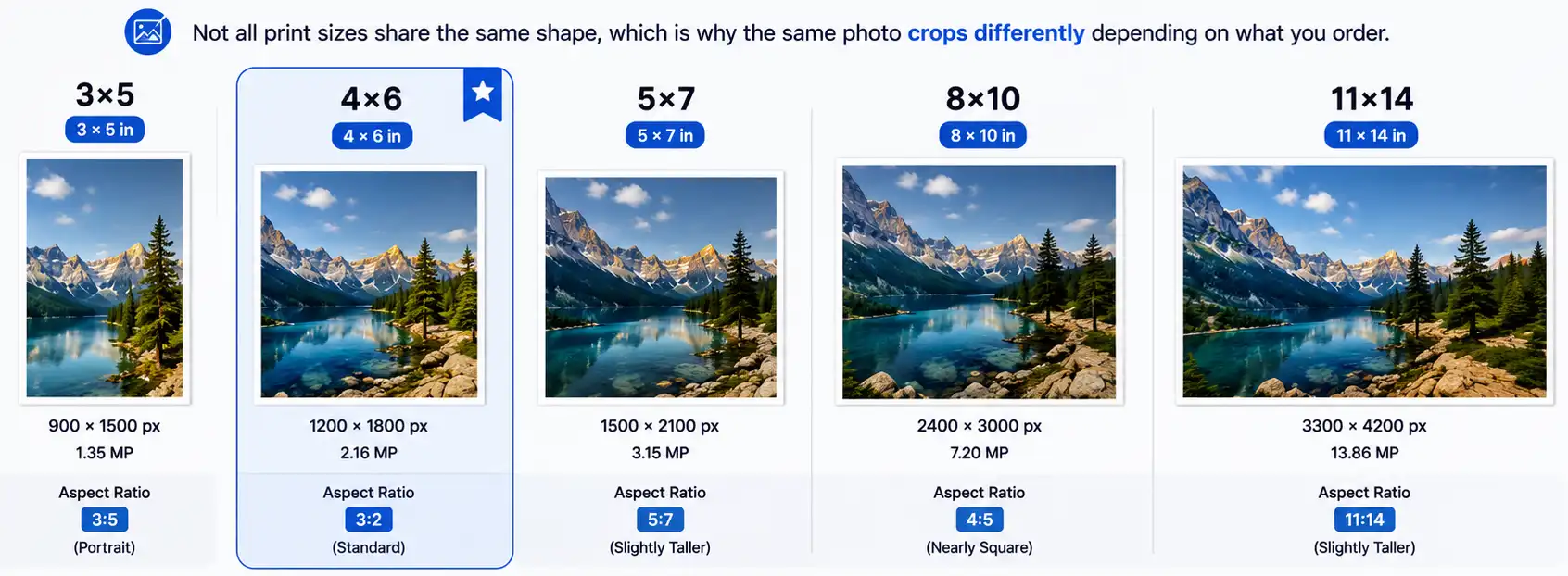
The practical takeaway: only 4×6 and 8×12 (and the rest of the 3:2 family) print a standard camera file edge to edge with nothing lost. 5×7 and 8×10 always crop — 8×10 is the most aggressive, cutting roughly two inches of length off a 3:2 image. That’s why studio portraits are usually composed loose: the photographer is leaving room for the 8×10 crop.
If you’re ordering multiple sizes of the same image, check the 8×10 crop first. If the composition survives that, it survives everything.
What Are 4×6 Photos Used For?
The 4×6 is the workhorse of consumer printing, and its versatility is the reason it hasn’t been displaced in ninety years.
Photo albums and sleeves — virtually every album, sleeve and photo box on the market is built around 4×6.
Frames — a 4×6 photo fits a standard 4×6 frame directly. If the frame is matted, expect the mat to overlap about ¼ inch on each side, so the visible image becomes roughly 3.5 × 5.5 inches. Compose with that in mind, or buy a mat cut for a 4×6 opening.
Postcards and greeting cards — 4×6 is a standard postcard size, which makes it the default for holiday cards and save-the-dates.
Scrapbooking and journals — 4×6 pockets are the backbone of pocket-page scrapbooking systems.
Product and listing photos — small enough to be cheap in volume, big enough to show detail.
Wallet prints — one 4×6 sheet holds two standard 2.5 × 3.5-inch wallet photos (a 5×7 sheet fits four).
Gifts and prints on demand — magnets, fridge displays, gift-box inserts.
It’s also the cheapest size at almost every lab and kiosk, which is why it remains the default for bulk ordering.
Why 4×6 Became the World’s Standard Photo Size
The 4×6 didn’t win because it looked nice — it won because of a piece of film.
In the early 1910s, Leitz engineer Oskar Barnack built a compact camera prototype using 35mm cine film, running it horizontally to get a 24 × 36mm frame — a 3:2 ratio. It became the Leica, released commercially in 1925, and made 35mm the format of serious portable photography. Kodak’s 1934 daylight-loading cassette then standardized 35mm for the mass market, and millions of cameras followed, all shooting 3:2 negatives.
Print labs sized their paper to match, and 4×6 became the dominant affordable print size for a 3:2 negative. When digital cameras arrived, most standard sensors kept the 3:2 ratio for continuity — so the size survived the switch from film to silicon.
(Phone cameras are an exception — most shoot 4:3, which is why phone photos often get cropped to fit a 4×6 print.)
Nearly a century later, a size shaped by 1910s film is still the default at every drugstore, kiosk, and online lab in the world.
How to Resize and Print a 4×6 the Right Way?
Run through this checklist before you place an order and you’ll avoid essentially every common problem:
- Start with the original file:- Camera roll, memory card, or a full-size cloud download — not a screenshot, messaging-app copy, or social download.
- Check your resolution:- You want at least 1200 × 1800 px. Below 800 × 1200 px, expect visible softness.
Crop to 3:2 yourself:- Set the crop ratio manually and decide what leaves the frame, rather than letting the lab’s automatic crop decide for you.
Choose borderless or bordered deliberately:- Borderless for edge-to-edge impact; bordered when the composition is tight.
Pick your finish:- Glossy for punchy colour and contrast (shows fingerprints); matte for a softer look that resists glare and handling — better under glass or in frequently handled albums.
Export as a high-quality JPEG (or TIFF, if the lab accepts it) in sRGB, and don’t downsize on the way out.
If your images need more than a crop — dust and blemish removal, colour and exposure correction, background cleanup, or batch resizing across hundreds of product shots — that’s exactly the kind of prep work our editing team handles day to day. It’s the difference between a print that’s technically correct and one that’s genuinely worth framing.
4×6 Photo Size Cheat Sheet
Everything on this page in one table — bookmark it, or save the graphic.
| Millimeters | 101.6 × 152.4 mm |
| Feet | 0.33 × 0.5 ft |
| Metric label | 10 × 15 cm (rounded) |
| Aspect ratio | 3:2 |
| Pixels @ 300 PPI | 1200 × 1800 px |
| Pixels @ 240 PPI | 960 × 1440 px |
| Pixels @ 200 PPI | 800 × 1200 px |
| Megapixels needed | 2.16 MP |
| Typical JPEG size | 1–3 MB |
| Typical TIFF size | ~6 MB |
| Also known as | 6×4, 10×15 cm, postcard size |
Frequently Asked Questions
Is a 4×6 photo the same as 6×4?
Yes. They’re the same print — the only difference is orientation. 4×6 typically means portrait (4 inches wide, 6 tall) and 6×4 means landscape. Same size, same 3:2 ratio, same price.
How many pixels is a 4×6 photo?
1200 × 1800 pixels at 300 PPI, which is the standard for professional-quality prints. At 200 PPI it’s 800 × 1200 pixels — still acceptable for casual viewing.
What is a 4×6 photo in cm?
10.16 × 15.24 cm. Most labs outside the US label this size as 10 × 15 cm, a rounded designation for the same print.
Can I print a 4×6 photo from my phone?
Yes, and the resolution will be far more than enough. But most phones shoot in a 4:3 ratio while a 4×6 is 3:2, so expect a slight crop along the long edge — or choose bordered printing to keep the full image with white margins.
Why does my 4×6 print look blurry?
Usually image compression, not print size. Photos saved from messaging apps, social media or screenshots lose data. Print from the original camera-roll or full-size cloud file instead.
How many megapixels do I need for a 4×6 print?
About 2.16 MP. Any smartphone from the last decade shoots 12 MP or more, so you have plenty of resolution to spare.
What size frame fits a 4×6 photo?
A standard 4×6 frame. If the frame includes a mat, the mat overlaps roughly ¼ inch per side, so the visible image is about 3.5 × 5.5 inches.
Is 4×6 a standard photo size?
Yes — it’s the most widely printed photo size in the world, supported by every consumer lab, kiosk and home photo printer.
Does Visuals Clipping resize and prepare photos for printing?
Yes. Our team handles cropping to print ratios, resizing, retouching and colour correction for individual images and large batches, with revisions included.